

How a Discount Code Works and Why It’s a Smart Move
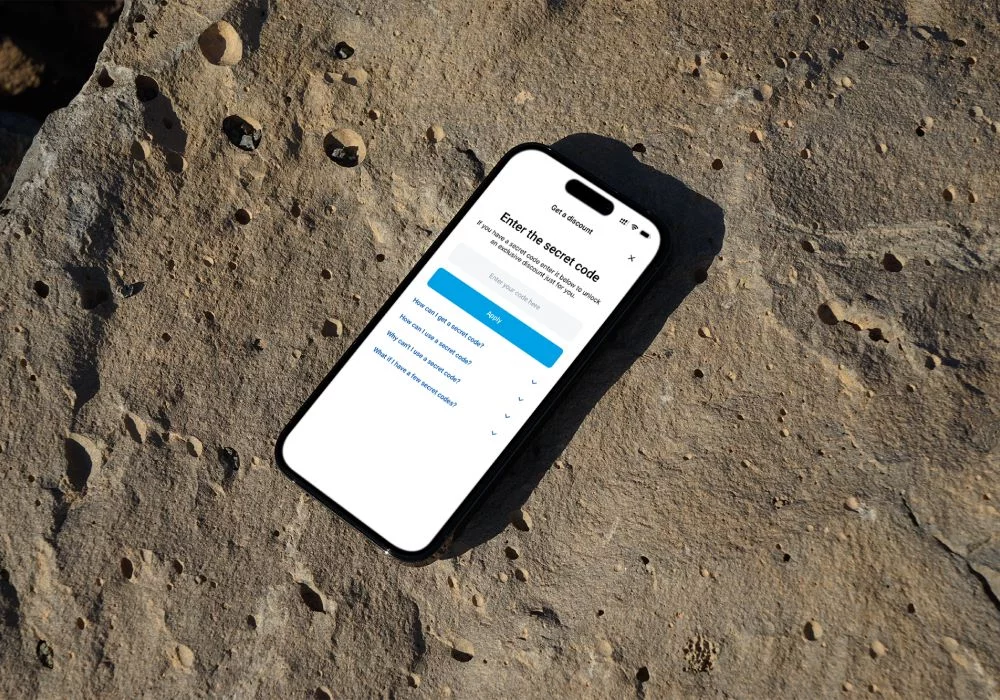
Discount codes at Renty.ae add extra value to your booking from the very start. You choose the car you want, apply the code, and the final price becomes more practical without any additional steps. Renty offers one of the best car rental services in Dubai, and the code simply enhances the booking you already planned to make. The steps are straightforward, the process takes moments, and the guide below shows exactly how to use your code during checkout so your trip begins with a small, clear advantage.
Quick navigation
- Find a Valid Coupon Code
- Website
- Email Newsletters
- Social Media
- Car promo codes
- Yacht promo codes
- Enter the Coupon Code (on the website)
- Redeem In-Person (inform the manager)
- Important considerations
- Mobile application
- Special offer
- FAQ
- I forgot that I had a coupon. Can I add the discount even though I have already picked up my vehicle?
- I booked my reservation online and didn't know where to add the discount code, can it still be added?
- How do I apply my car rental discount code?
- Can multiple promo codes be applied?
- What are some more ways to save money on car rentals?
Find a Valid Coupon Code
Before you start your booking, make sure your car rental coupon is still active. It only takes a quick check to confirm it works - and to avoid surprises at checkout. There are a few simple ways to do that, which we’ll walk you through below.
Website
Start with the source - the Renty.ae website. All current car rental discounts and limited-time promotions appear right on our homepage and in the Special Offers section. We regularly update deals to ensure you always get the best price guarantee available.
Email Newsletters
If you like getting deals before everyone else, sign up for our newsletters. We tailor offers and share useful information for you, including discount codes. You’ll get updates about new cars, short-term offers, and special promo codes that appear for a few days only.
Social Media
Our social pages are where quick deals usually show up first. Follow Renty on Instagram or Facebook and keep an eye on stories - that’s where we drop surprise offers and last-minute discounts that go fast.
Car promo codes
We often offer car rental options for every mood and plan - maybe you want something small for city driving, or a luxury model for a special occasion. Once you’ve found your match, add it to the cart and move to checkout. You’ll see a field for the promo code right before payment information. Enter the code into it. As an alternative, contact the manager, and your discount will show up right away.
Yacht promo codes
The same idea works for yacht bookings too. Choose the yacht that fits your plan - maybe a short cruise or a private party - and add it to your cart. When you reach checkout, you'll notice a space for a promo code. Type it in or tell the manager before payment over the phone, and you’ll see your discount applied instantly.
Enter the Coupon Code (on the website)
At checkout, you’ll see a small box labeled Get a Discount. That’s where your savings go. If you have one from our rental coupons, paste it into the field and press Apply. The total will refresh in a second. If the code is active, the new price appears right away; if not, no worries - you can try another code or ask the manager to help before you finalize payment.
Redeem In-Person (inform the manager)
If you prefer booking in person, you can also redeem your code at our Dubai office. Just show the team your printed or digital coupon before paying - they’ll add the discount for you. FYI: You can reach the manager by phone. Just a small note: promo codes don’t combine with cashback or other ongoing deals. Pick the option that works best for you and use it for your next car rental to get the most value.
Important considerations
Each coupon has its own terms, and they’re worth reading - some offers may have limits or might not apply to every partner. If plans change and you cancel your booking, that’s okay: in most cases, you can still use the same code next time you reserve. It keeps things simple and fair.
Mobile application
All the same features work smoothly in our mobile app, too. It’s quick, easy to use, and perfect for booking on the go - whether you’re renting a car or a yacht. Download it to explore, apply your promo codes, and manage everything right from your phone.
Special offer
Good news for anyone planning a trip soon - until December 31, 2025, you can use two active rental coupons for your booking: CAR5 for cars and YACHT5 for yachts. Each code gives you 5% off, adding an easy extra benefit to your booking from the start.
You can also earn Skywards Miles through the Skywards Everyday app while booking - an extra bonus for every ride or cruise you take.
FAQ
I forgot that I had a coupon. Can I add the discount even though I have already picked up my vehicle?
If the car has already been picked up, the payment can’t be changed - discounts only apply before checkout. You can keep the code and use it for another booking later. If you’re unsure whether it still works, reach out to the manager - they can check it in a moment and let you know right away.
I booked my reservation online and didn't know where to add the discount code, can it still be added?
The field for the discount code shows up right before payment, so it can’t be added later. You can still contact the manager - they’ll look into your booking and see what can be done in your situation.
How do I apply my car rental discount code?
You can use car rental coupons both on the website and in our mobile app. Just pick your car, go to checkout, and enter the code in the discount field before payment. The price will update right away - and if you’re booking through the app, the steps are exactly the same.
Can multiple promo codes be applied?
Just one code can be used for each booking. You can refer to the section above for a short reminder on how promo codes work and pick the one that fits your booking best.
What are some more ways to save money on car rentals?
You can always check our Special Offers page for the latest deals - it’s updated regularly with seasonal discounts and limited-time promotions. Another easy way to save is by using the Skywards Everyday app to collect Skywards Miles every time you book.